How To Use
Key Shortcuts
CTRL + Z = Undo
CTRL + Y = Redo
Scene Controls
Scene Rotation - right mouse & move
Pan Skin - middle mouse & move, or arrow keys
Zoom Scene - mousewheel
Paint Tools
 - Paint brush, changes the color of a pixel to the selected color
 - Bucket Fill, changes the color of a skin part of layer to the selected color
 - Color Picker, set current skin's pixel color as selected color
 - Eraser, remove color from pointed pixel
Note: You can use Left Click & move combination for edit multiple pixels/parts of skin
Colors Palette
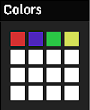
This window uses for make some set of predefined colors for quick access them when you edit your skin. For fill pallete you should Left Mouse click on 1 from 16 squares and use "Brush Color" color picker tool from Controls window for fill this square. You can set 16 colors by this way and then use them by Left Click on color square, "Brush Color" tool will be set automaticaly.
Controls Window
Show Grid - show/hide skin skeleton
Show Scene - show/hide minecraft world around
Light Scene - switch between dark/light world around
Brush Color - set current color for Paint Tools
Clear Skin with Color - button for clear all skin with selected color in "Clear Color" tool
Clear Color - set current color for "Clear Skin with Color"
Clear Skin Full Transparent - erase all pixels of Skin
Walk - enable/disable walk animation of skin
Samples - load Skin from 10 predefined samples
Download Skin on Disk - save your Skin on your device
Open skin file from Disk - open your Skin from Your device
Username - any username from Minecraft world
Use skin from username - load Skin from minecraft world which in "Username" input
Layers of Body Parts
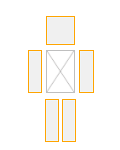
Minecraft's Skin contains from 2 layers, "Body" and "Outer Layer". "Outer Layer" uses for some clothes in most cases, for example headphones on head, or gloves on hand. "Body" this is layer under "Outer Layer" and contains main content of Skin. These "Body" and "Outer Layer" controls uses for show/hide some parts of Skin, head, body, hands, legs. Sometime you want remake all part or sometime "Outer Layer" interferes with editing of "Body", then you can fast switch visibility of parts with these controls.